
SnapCount logoSnapCount.app

Affiliate starter kit

Start with an accurate, useful SnapCount recommendation.

Follow the guide, choose a relevant playbook, and copy approved material without leaving this page. The original partner downloads remain available below.

Approved product preview
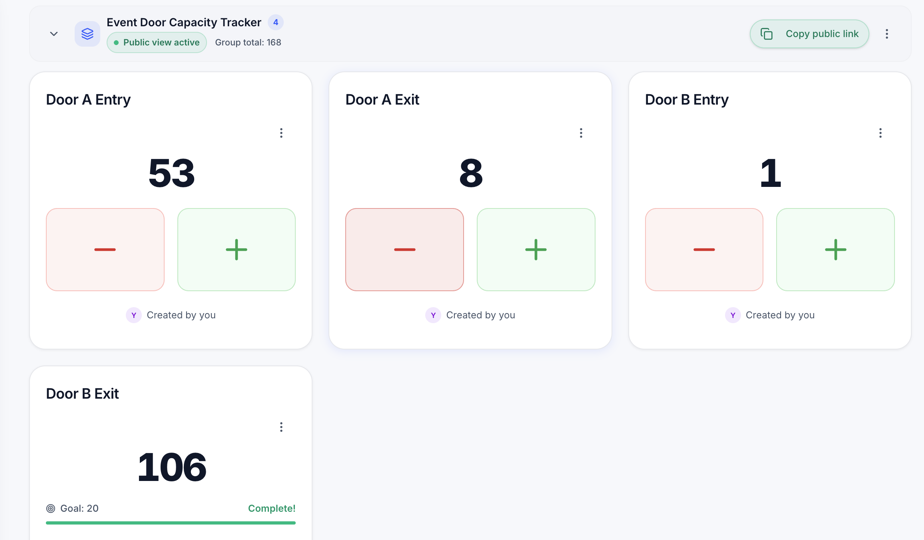
SnapCount Event Door Capacity Tracker template with entrance and exit counters

Start here

From application to published recommendation in four steps

  1. 1

    Apply or sign in through Affonso.

  2. 2

    Copy the referral link assigned to your partner account.

  3. 3

    Choose an audience and promotion format that fit a real counting workflow.

  4. 4

    Add the approved disclosure near your link, then publish.

Choose a useful angle

Three practical promotion playbooks

Events and venues

Show how separate gates can replace clipboard rollups with one synchronized live count.

  • Give each gate the same shared counter.
  • Use a link or QR code to get the crew counting quickly.
  • Follow one live total across phones, tablets, and laptops.
Retail and warehouses

Focus on practical manual counts that a team can complete with the devices they already have.

  • Count foot traffic across doors or zones.
  • Coordinate stocktakes and aisle counts.
  • Export saved records when the work is complete.

Educators, consultants, and community teams

Recommend a lightweight shared tally when the workflow does not need new sensors or hardware.

  • Explain the real counting problem before introducing the tool.
  • Demonstrate a live manual count across two devices.
  • Be clear about who benefits from saved records and team controls.

Approved copy

Copy, personalize honestly, and add your referral link

Keep product claims intact. You can add your genuine experience and audience context.

Event social post

For event crews still combining separate tallies.

If your event crew still combines clipboard tallies after the rush, SnapCount gives every gate one live shared count across phones, tablets, and laptops. Start with a free 15-minute session, then pay once if the team needs saved records and exports: [YOUR AFFILIATE LINK]

Retail or warehouse post

For teams doing foot traffic, aisle counts, or stocktakes.

For manual foot traffic, aisle counts, and stocktakes, you do not always need new hardware. SnapCount lets a crew share one live tally, then export the record after the work is done: [YOUR AFFILIATE LINK]

Newsletter copy

A short explanation for an email audience.

Subject: A simpler shared counter for field teams

When several people are counting at gates, aisles, or stations, the hard part is keeping everyone on the same number. SnapCount is a shared live tally counter that works across phones, tablets, and laptops. Teams can try a 15-minute guest session without an account, then choose a one-time plan when they need saved counters, exports, and team controls.

See whether it fits your workflow: [YOUR AFFILIATE LINK]

Review outline

A five-part structure for an honest product walkthrough.

1. Describe the real counting workflow and the problem with separate devices.
2. Show how a guest session is shared by link or QR code.
3. Show the live count updating across two devices.
4. Explain when saved records, exports, roles, and activity history matter.
5. Link to current pricing and clearly disclose your affiliate relationship.

Approved disclosure

Place this before or near the affiliate recommendation.

This post contains an affiliate link. If you purchase through it, I may earn a commission at no additional cost to you.

Approved facts and guardrails

Use these facts when explaining where SnapCount fits and where it does not.

  • Good-fit workflows include event headcounts, venue occupancy, retail foot traffic, stocktakes, warehouse checks, field research, volunteer coordination, and shared team tallies.
  • An internet connection is required for multi-device live synchronization.
  • SnapCount is a manual counting tool, not an AI, sensor, or offline automation product.
  • Always link readers to the current pricing page instead of copying prices into lasting content. View current pricing.
  • Do not invent discounts, testimonials, results, endorsements, or feature claims.

Download library

Original partner files and references

Link and disclosure guide

Use your individual Affonso link whenever you recommend SnapCount. Put a clear affiliate disclosure close to the recommendation, before readers can act on it.

Get your assigned referral link

New partners can apply through Affonso. Existing partners can sign in to copy their link and open the partner dashboard.

Affiliate Terms apply to every promotion.