
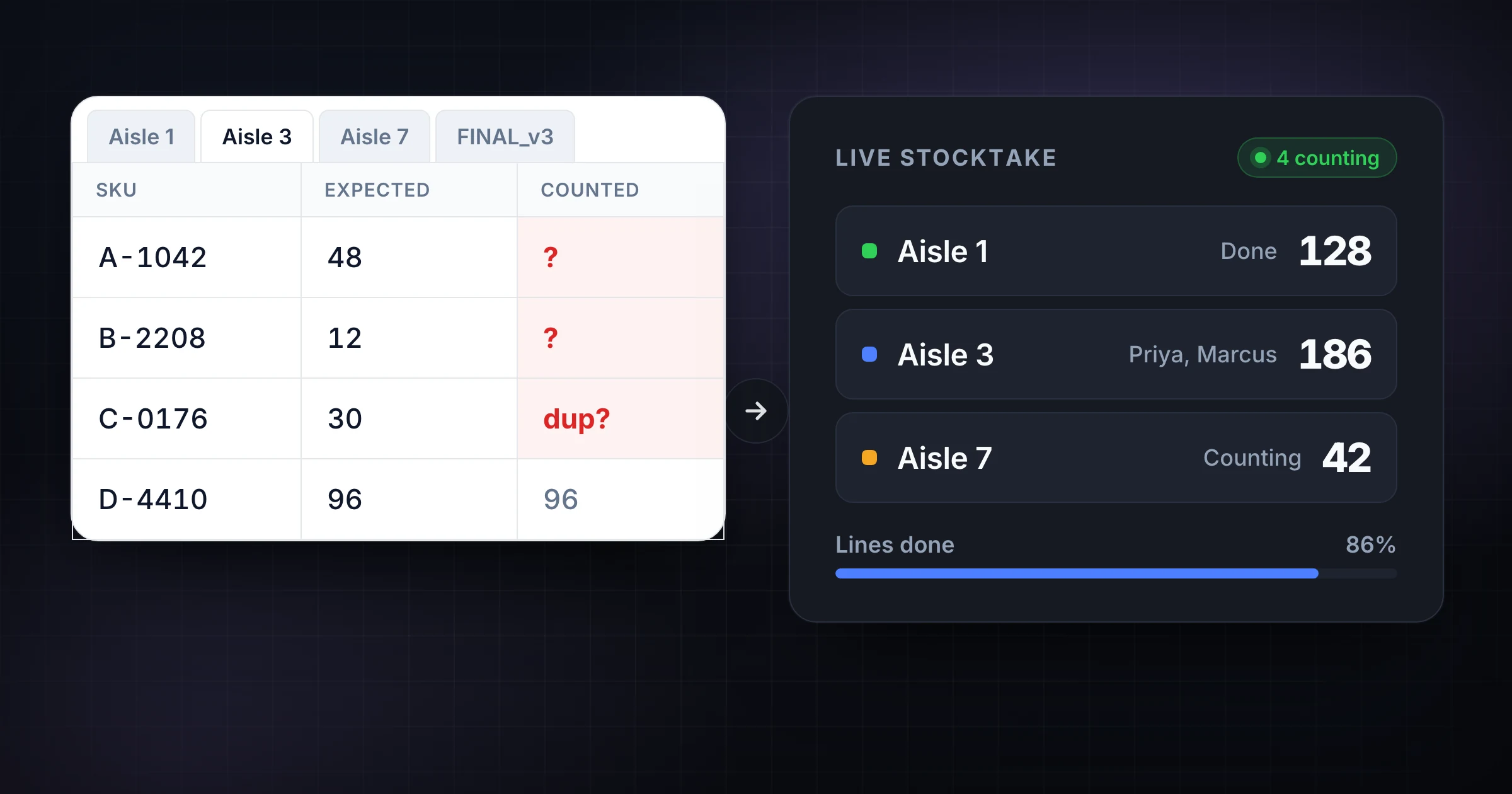
The workbook has a tab for every aisle. Someone renamed their copy STOCKTAKE_FINAL_v3. Two counters are on the same bay. The lead cannot answer "which zones are done?" without interrupting the floor.
That is not an inventory theory problem. That is a spreadsheet stocktake asked to do live shared zone work.
This guide compares spreadsheet stocktakes vs live shared zones for warehouse and ops teams, and maps a conversion ladder: prove multi-device zone sync with Guest Mode, then move to Pro only when the count must survive as a saved record with export, stats, and daily reports. Written by SnapCount (Lead Catalyst). Verify current plan details on pricing before you buy.
Quick rule: Keep the spreadsheet for SKU prep and variance analysis. Move floor counting into live shared zone counters when two or more people count different aisles in the same window. Prove it free with Guest Mode before you pay.
Honest limits: SnapCount is a manual collaborative counting tool for web and iPhone. It is not a WMS or ERP, not barcode scanner hardware, and it does not certify a count for legal, medical, safety, capacity, or regulatory purposes.
When a spreadsheet stocktake is still fine
A spreadsheet stocktake still wins when:
- One person owns every quantity and nobody else needs the live zone total
- The item list is short enough to review by hand
- Stock is frozen (or movement is so small that one owner can log exceptions)
- You do not need live answers to "which aisle is done?"
- The sheet is a one-off analysis list, not a multi-aisle ops board during the count
If that is the job, do not overbuild. Use a locked template, clear item IDs, and a separate variance tab. Start with the stocktake checklist for cutoff, ownership, and closeout. For sheet-first planning, see Google Sheets inventory tracker vs SnapCount.
Next action: One owner, short list, no live zone progress → keep the workbook. Two aisles in the same window → Guest Mode proof below.
Where spreadsheet stocktakes break across warehouse zones
The sheet still stores SKUs. The workflow does not survive several people on the floor.
- Version conflict: STOCKTAKE_FINAL_v3, a filtered copy, and last night's export all look official
- Missed or double zones: two counters land on the same bay while another aisle stays empty
- Phone-hostile grids: pinch, scroll, sort, and mistype on a warehouse phone
- No live progress: the lead cannot see which zones are open without walking the floor or interrupting counters
- Closeout delay: someone still has to merge tabs, chase texts, and type quantities after the crew is already gone
Those failures are not "Excel cannot hold a number." They are missing zone ownership, missing live progress, and a closeout that starts only after the count is supposed to be finished.
The inventory counter app page covers the broader tool category. This page stays on the stocktake decision: aisle tabs vs live shared zones, then Guest to prove it and Pro when the record must last.
Live shared zones: one stocktake, many counters
A live shared zone setup gives each aisle, cage, or overflow area its own counter, then keeps connected devices on the same totals.
What changes on the floor:
- Ownership: one zone, one running total, instead of a tab anyone can sort
- Live progress: the lead can see which zones are still open without a radio check
- Less transcription: taps go into the zone counter, not into a cell after the rush
- QR or link join: a second phone, tablet, or laptop joins the same stocktake without an account
On 29 Aug 2026, SnapCount shipped a way to start a shared retail stocktake from one list: paste up to three retail counting areas and create every zone counter in one step. Warehouse teams use the same zone-counter idea, plus the Inventory Audit and Warehouse Picking templates, from the warehouse counting workflow.
SnapCount still depends on a person confirming what is on the shelf. If the hard problem is scanning labeled UPCs into a WMS, read inventory counter app vs barcode scanner and stay on scanners for item lookup. Come back here when the hard problem is coordinating people across aisles.
The conversion ladder: spreadsheet → Guest → Pro
Stop on the first rung that fits the job.
Rung 1: Spreadsheet for prep and variance analysis
Keep the workbook for the SKU list, expected quantities, and variance math. A hybrid is fine: the sheet plans the count and receives the export later. The floor should not be the place where five people edit the same row.
If the current pain is paper clipboards rather than aisle tabs, use the paper tally sheet to live shared counter path instead. This page is the spreadsheet-tab version of the same ladder.
The moment two people must count different aisles in the same window, and a lead needs progress during the count, move to Rung 2.
Rung 2: Guest Mode, prove live shared zones for free
As of 7 Sep 2026 (changelog + pricing):
- Start a shared live stocktake without an account
- Share by QR or link so a second device can join
- Guest sessions start with about 1 hour and can stay open while active up to about 4 hours
- On iPhone 1.1.3, you can save a guest session while signing up so counters arrive in your workspace rather than ending with the session
- Plus and minus stay available when the connection drops. Taps are held on the device and sent when the connection returns (changelog, 5 Sep 2026). Keep the page open until they are sent. That protects the count on this device during a blip. It does not invent perfect live alignment across every disconnected device until reconnect.
Proof steps: create two zone counters (Aisle 3 and Aisle 7) → show the QR or send the link → join from a second device → confirm the lead sees both zone totals → save into an account if the stocktake should survive the session.
That test answers the commercial question: did we stop merging aisle tabs and asking the floor which zones are done?
Rung 3: Pro when the stocktake becomes an operating record
Stay on Guest while proving sync. Upgrade when the numbers must outlive the session.
Pro ($15/mo or $129/yr) is the usual stop when you need:
- Saved counters and seats
- Export (CSV/JSON snapshots as on pricing)
- Week / month / year stats
- Daily CSV or JSON downloads, or scheduled email delivery of daily reports (shipped 6 Sep 2026)
Enterprise ($39/mo or $349/yr) adds event history, activity logs, and locks, plus threshold / capacity alerts in the dashboard inbox and by email (shipped 5 Sep 2026). Lifetime is not a current purchasable plan. Existing Team $49 and Enterprise $79 lifetime buyers keep access as Lifetime (legacy).
Members join free on paid organization plans. Re-check pricing on publish day. For the broader solo-vs-shared decision, see free solo counters vs shared team.
Decision checklist: sheet, Guest, or Pro
| Situation | Spreadsheet | Guest Mode | Pro / Enterprise |
|---|---|---|---|
| One person owns every quantity | Yes | Optional | No |
| SKU prep or variance analysis only | Yes | No | Export back into the sheet |
| Two or more aisles in the same window | No | Prove first | Later if the count repeats |
| Lead needs live "which zones are done?" | No | Yes | Yes, then save the record |
| Recurring stocktake; CSV/JSON or daily reports | No | Trial only | Pro: save, export, stats, daily reports |
| Locks, activity history, or threshold alerts | No | No | Enterprise |
Ask: Do we still merge aisle tabs or text photos of the grid? Does a lead need zone progress while others count? Must the figures survive tab closes and next week's variance review? Yes to the last two: Guest proof is overdue. Pro is likely once the workflow repeats.
Run the next stocktake proof in ten minutes
- Pick one upcoming stocktake that currently uses a tab per aisle, or a file named FINAL_v3.
- Keep the SKU list and expected quantities in the spreadsheet. Do not ask the floor to type into the grid.
- Write a one-line count rule ("Aisle 3 owns this counter. Add the units you physically see.").
- Start a free Guest Mode session. Create two zone counters. Open the QR or link.
- Join from a second device. Count on both. Confirm the lead sees both zone totals without calling the aisle.
- If you need that setup next week, or a CSV/JSON handoff into the variance tab, open pricing. Choose Pro for saved counters, seats, stats, and daily reports. Enterprise only for history, locks, or threshold alerts.
Platform note: SnapCount shared counting is available on web and iPhone. Do not assume an Android app from this guide.
Frequently asked questions
When is a spreadsheet stocktake still the right tool?
A spreadsheet is enough when one person owns every quantity, the list is short, stock is mostly frozen, and nobody needs live zone progress during the window. Keep the sheet for SKU prep and variance analysis even after you move floor counting into live shared zones.
How do I prove live shared zones without paying?
Use Guest Mode: start a shared live count without an account, create two zone counters, share by QR or link, and join from a second device. Sessions start with about 1 hour and can stay open while active up to about 4 hours. You can later save a guest session into an account so counters arrive in a workspace instead of ending with the session.
When should a warehouse move from Guest Mode to Pro?
Guest is enough to prove live zone sync. Pro ($15/mo or $129/yr) is worth it when the stocktake must survive as a saved record with seats, export, week/month/year stats, and daily CSV or JSON downloads or scheduled email delivery. Event history, activity logs, and locks remain Enterprise ($39/mo or $349/yr), along with threshold alerts in the dashboard inbox and email.
Keep the spreadsheet for variance. Count the aisles live
Spreadsheet tabs are not the enemy. They are the wrong tool for live multi-aisle incrementing. Use the workbook for prep and variance. Use Guest Mode to prove one stocktake across shared zone counters. Use Pro when the count becomes a recurring operating record you can save, seat, export, and report on.
Start with the stocktake checklist for cutoff and closeout. After you prove sync, keep the warehouse counting workflow nearby, and open pricing only when the record has to last.
Topics: warehouse stocktake, spreadsheet stocktake, live shared zones, inventory audit, guest mode
About SnapCount Team
The SnapCount Team builds and tests shared counting workflows for events, inventory, attendance, and field work. We review these articles when product workflows change and link to the tools we use to validate them.
Contact SnapCount support