
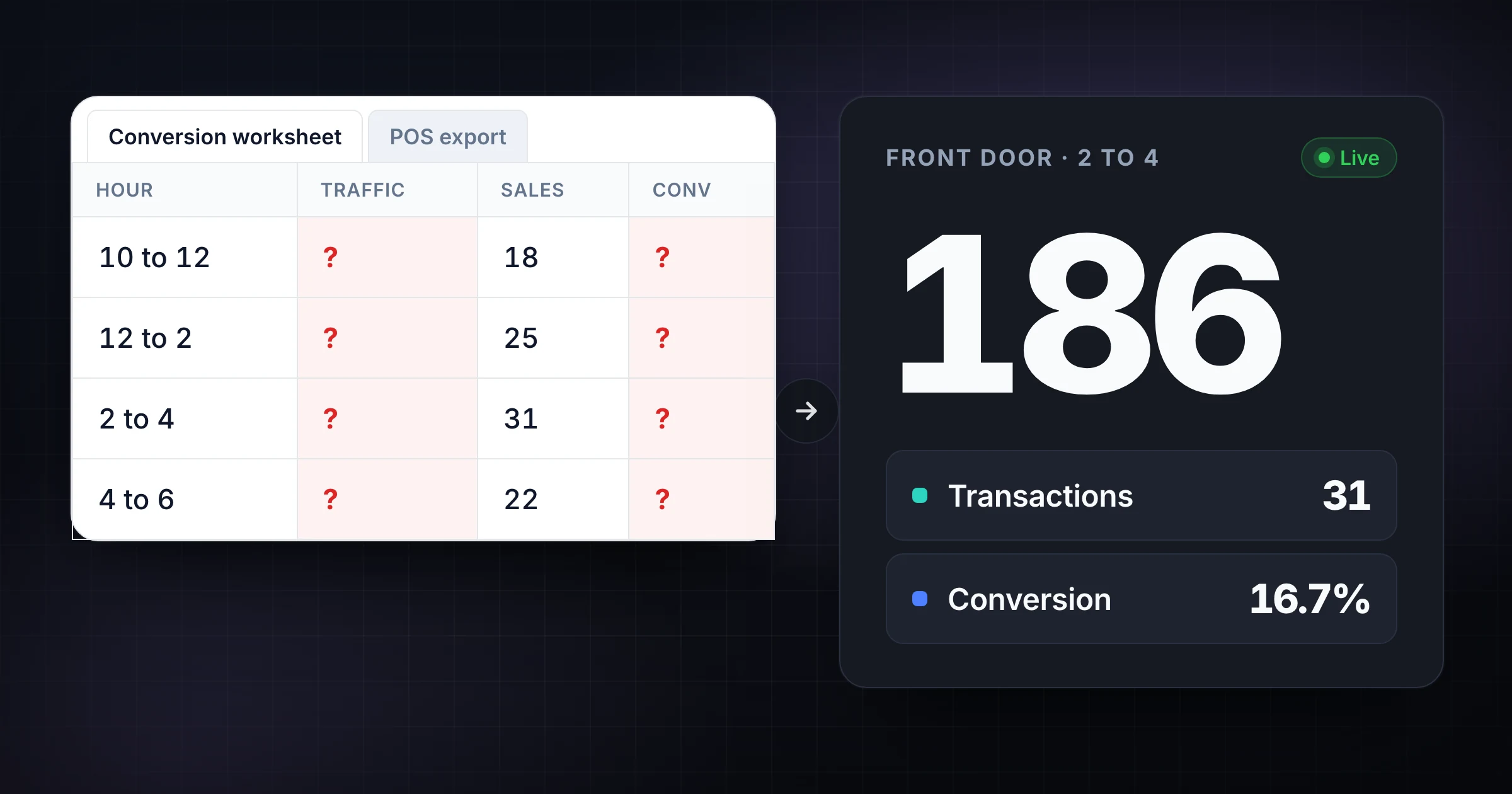
The POS already knows how many tickets closed. The clipboard still has this morning's door marks in groups of five. Someone will type those marks into a sheet after close, divide by transactions, and call it conversion.
That is not a math problem. That is a worksheet gap: sales already live in the register, while foot traffic still lives on paper until someone transcribes it.
This page is the ops worksheet that pairs door traffic with POS, then the handoff into live shared door counting. For the formula, hourly patterns, and the four store-problem types, use foot traffic data and retail conversion rate. This post stays on the sheet you fill, and on when that sheet should stop being the live door total. Written by SnapCount (Lead Catalyst). Verify current plan details on pricing before you buy.
Quick ladder: Keep a static worksheet for one door and after-close pairing → prove Guest Mode live door counts with a second phone → move to Pro only when the traffic record must survive as a saved export.
Honest limits: SnapCount is a manual collaborative counter for web and iPhone. It is not a camera, door beam, or Wi-Fi people counter. It does not pull POS tickets automatically. It does not certify occupancy, fire-code, legal, medical, or safety numbers. Confirm capacity rules with the venue and the people running the floor.
What the worksheet must capture
A retail conversion worksheet is useful only when traffic and transactions share the same clock, the same entrance rules, and the same definition of a visit.
Capture at least these columns:
| Column | What goes here |
|---|---|
| Date | The trading day you will compare later |
| Hour block | The same window you will pull from POS (for example 2 p.m. to 4 p.m.) |
| Entrance | Front door, side door, mall entrance. One row per door if you count more than one |
| Foot traffic | People who crossed into the store under your visit rule |
| Transactions | Completed POS tickets for that same door-day-hour, or the store total if you only have one till |
| Conversion % | Transactions divided by foot traffic, times 100 |
| Staff | Associates on the floor in that block |
| Notes | Weather, a promotion, a queue, a stockout, a missing counter |
Write the visit rule once at the top of the sheet. Count shoppers who enter. Exclude staff, vendors, and the same person stepping out and back in. If two doors are open, do not treat an uncounted door as zero traffic. That inflates conversion.
The foot traffic counter app is the counting surface. This worksheet is the pairing surface: door counts on the left, POS on the right, conversion in the middle.
Next action: One door, one closer, no live traffic question during the shift → stay on the sheet. Two doors, or a lead who needs the number now → Guest Mode proof below.
When a static spreadsheet is still fine
A static conversion worksheet still wins when:
- One person owns every door tap and nobody else needs the live traffic total
- You are running a short sample (a Saturday block, a promo weekend), not a live ops board
- POS pairing happens after close, and that delay is acceptable
- You do not need an answer to "how many have come through Front since noon?"
- The sheet is a review artifact for Monday, not the counting surface during the rush
If that is the job, do not overbuild. Copy the columns above into Sheets or Excel, pull tickets from POS at close, and calculate conversion once. For one-person digital vs shared counting, see free solo counters vs shared team.
Where the worksheet stalls without live door counts
The sheet still holds the formula. The workflow does not survive several people on the doors.
- Clipboard lag: traffic marks stay on paper until someone types them. Conversion waits.
- Two entrances: Front and Side each have a number. The lead still has to text, photograph, or guess the store total.
- No live answer: "Are we light on coverage because traffic is down, or because we are missing the rush?" cannot be answered from a sheet that fills after close.
- Handoff drift: the opener's clipboard walks out. The closer starts from memory.
- Inconsistent rules: one shift counts kids, the next does not. Hourly conversion becomes noise.
Those failures are not "Excel cannot divide two numbers." They are missing a live door total while the store is still open. The worksheet should receive a trusted traffic number. It should not be the thing staff increment at the threshold.
If the current pain is paper marks rather than POS pairing, use the paper tally sheet to live shared counter path. If the pain is aisle tabs on a stocktake, use warehouse stocktake: spreadsheet vs live zones. This page stays on door traffic → conversion worksheet → live handoff.
The ops ladder: worksheet → Guest → Pro
Stop on the first rung that fits the job.
Rung 1: Static worksheet for POS pairing
Keep the sheet for hour blocks, POS tickets, conversion %, staff, and notes. A hybrid is fine: the worksheet is the review surface. Live door counting should not be five people editing the same traffic cell.
The moment two people must count different doors in the same window, or a lead needs traffic during the shift, move to Rung 2.
Rung 2: Guest Mode, prove live door counts for free
As of 7 Sep 2026 (changelog + pricing):
- Start a shared live door count without an account
- Share by QR or link so a second device can join
- Guest sessions start with about 1 hour and can stay open while active up to about 4 hours
- On iPhone 1.1.3, you can save a guest session while signing up so counters arrive in your workspace rather than ending with the session
- Plus and minus stay available when the connection drops. Taps are held on the device and sent when the connection returns (changelog, 5 Sep 2026). Keep the page open until they are sent. That protects the count on this device during a blip. It does not invent perfect live alignment across every disconnected device until reconnect.
Use the Retail Footfall template, or create one counter per entrance (Front, Side, Mall). Staff tap at the door. The lead watches both totals. At close, copy the live traffic numbers into the worksheet and pull POS for the same hour blocks.
You can start that count from the free retail foot traffic counter in the browser, then share the live session. The tool is the counting surface. The worksheet stays the pairing surface.
Proof steps: create Front door and Side door counters → show the QR or send the link → join from a second device → confirm both door totals update → copy the finals into the worksheet → add POS transactions → calculate conversion.
That test answers the commercial question: did we stop photographing clipboards and guessing traffic after close?
Rung 3: Pro when the traffic record must survive
Stay on Guest while proving sync. Upgrade when the door totals must outlive the session.
Pro ($15/mo or $129/yr) is the usual stop when you need:
- Saved counters and seats
- Export (CSV/JSON snapshots as on pricing)
- Week / month / year stats
- Daily CSV or JSON downloads, or scheduled email delivery of daily reports (shipped 6 Sep 2026)
Enterprise ($39/mo or $349/yr) adds event history, activity logs, and locks, plus threshold / capacity alerts in the dashboard inbox and by email (shipped 5 Sep 2026). Lifetime is not a current purchasable plan. Existing Team $49 and Enterprise $79 lifetime buyers keep access as Lifetime (legacy).
Members join free on paid organization plans. Re-check pricing on publish day. SnapCount still does not auto-import POS. You pair the export with tickets the same way you pair a clipboard: same hour, same visit rule, then conversion.
Fillable worksheet (illustrative sample)
Copy these columns into Sheets or Excel. The rows below are illustrative. They are not SnapCount customer results.
| Date | Hour block | Entrance | Foot traffic | Transactions | Conversion % | Staff | Notes |
|---|---|---|---|---|---|---|---|
| Sat 7 Sep | 10 a.m. to 12 p.m. | Front | 110 | 18 | 16.4% | 3 | Morning browse |
| Sat 7 Sep | 12 p.m. to 2 p.m. | Front | 190 | 24 | 12.6% | 3 | Lunch queue |
| Sat 7 Sep | 2 p.m. to 4 p.m. | Front | 240 | 25 | 10.4% | 2 | Understaffed |
| Sat 7 Sep | 2 p.m. to 4 p.m. | Side | 80 | (store till) | (see note) | 1 | Counted, till is shared |
| Sat 7 Sep | 4 p.m. to 6 p.m. | Front | 280 | 27 | 9.6% | 2 | Peak traffic |
How to fill it:
- Lock the visit rule and the hour blocks before the store opens.
- Count traffic live (Guest Mode per entrance, or one person on one door).
- After close, pull POS tickets for the same blocks.
- Conversion % = transactions / foot traffic × 100.
- If two doors share one till, report store conversion against summed traffic, not against one door. Keep per-door traffic anyway. That is the staffing signal.
The 2 p.m. to 6 p.m. rows are the worksheet doing its job: traffic rose, staff dropped, conversion followed. That is an ops finding, not a hardware finding. Read the pattern library on the conversion rate guide once you have two clean weeks of this table.
Decision checklist: sheet, Guest, or Pro
| Situation | Static worksheet | Guest Mode | Pro / Enterprise |
|---|---|---|---|
| One door, one person, pair POS after close | Yes | Optional | No |
| Review conversion on Monday from a finished table | Yes | No | Export back into the sheet |
| Two doors in the same window | Weak | Prove first | Later if the count repeats |
| Lead needs live "how many through Front?" | No | Yes | Yes, then save the record |
| Weekly conversion file; CSV/JSON or daily reports | Manual only | Trial only | Pro: save, export, stats, daily reports |
| Locks, activity history, or threshold alerts | No | No | Enterprise |
Ask: Do we still type clipboard marks after close? Does a lead need door traffic while others tap? Must the traffic figures survive tab closes and next week's conversion review? Yes to the last two: Guest proof is overdue. Pro is likely once the workflow repeats.
Run the next conversion proof in ten minutes
- Copy the worksheet columns into a sheet. Label the first rows illustrative until you replace them with today's numbers.
- Write a one-line visit rule ("Add 1 when a shopper crosses Front. Do not count staff or re-entry.").
- Start a free Guest Mode session. Create Front door and, if needed, Side door. Open the QR or link.
- Join from a second device. Tap on both. Confirm the lead sees the door totals without a radio check.
- At close, copy the live traffic numbers into the worksheet. Pull POS for the same hour blocks. Calculate conversion.
- If you need that setup next week, or a CSV/JSON handoff into the review file, open pricing. Choose Pro for saved counters, seats, stats, and daily reports. Enterprise only for history, locks, or threshold alerts.
Platform note: SnapCount shared counting is available on web and iPhone. Do not assume an Android app from this guide.
Frequently asked questions
When is a static retail conversion worksheet enough?
A static worksheet is enough when one person owns every door tap, POS pairing can wait until close, and nobody needs live traffic during the shift. Keep the sheet for hour blocks, tickets, conversion %, staff, and notes even after you move door counting into a live shared counter.
How do I prove live door counts without paying?
Use Guest Mode: start a shared live count without an account, create one counter per entrance, share by QR or link, and join from a second device. Sessions start with about 1 hour and can stay open while active up to about 4 hours. You can later save a guest session into an account so counters arrive in a workspace instead of ending with the session. The free retail foot traffic counter is a convenient start.
When should a store move from Guest Mode to Pro?
Guest is enough to prove live door sync. Pro ($15/mo or $129/yr) is worth it when the traffic record must survive as a saved counter with seats, export, week/month/year stats, and daily CSV or JSON downloads or scheduled email delivery. Event history, activity logs, and locks remain Enterprise ($39/mo or $349/yr), along with threshold alerts in the dashboard inbox and email. SnapCount still does not auto-pull POS or certify occupancy.
Keep the worksheet for conversion. Count the doors live
A conversion worksheet is not the enemy. It is the wrong tool for live multi-door incrementing. Use the sheet to pair traffic with POS after the hour. Use Guest Mode to prove one live total per entrance. Use Pro when that traffic record has to exist next week.
Start with the conversion rate guide for the formula and patterns. Count immediately on the retail foot traffic counter. Open pricing only when the record has to last.
Topics: retail foot traffic, conversion rate, worksheet, guest mode, door counting
About SnapCount Team
The SnapCount Team builds and tests shared counting workflows for events, inventory, attendance, and field work. We review these articles when product workflows change and link to the tools we use to validate them.
Contact SnapCount support