
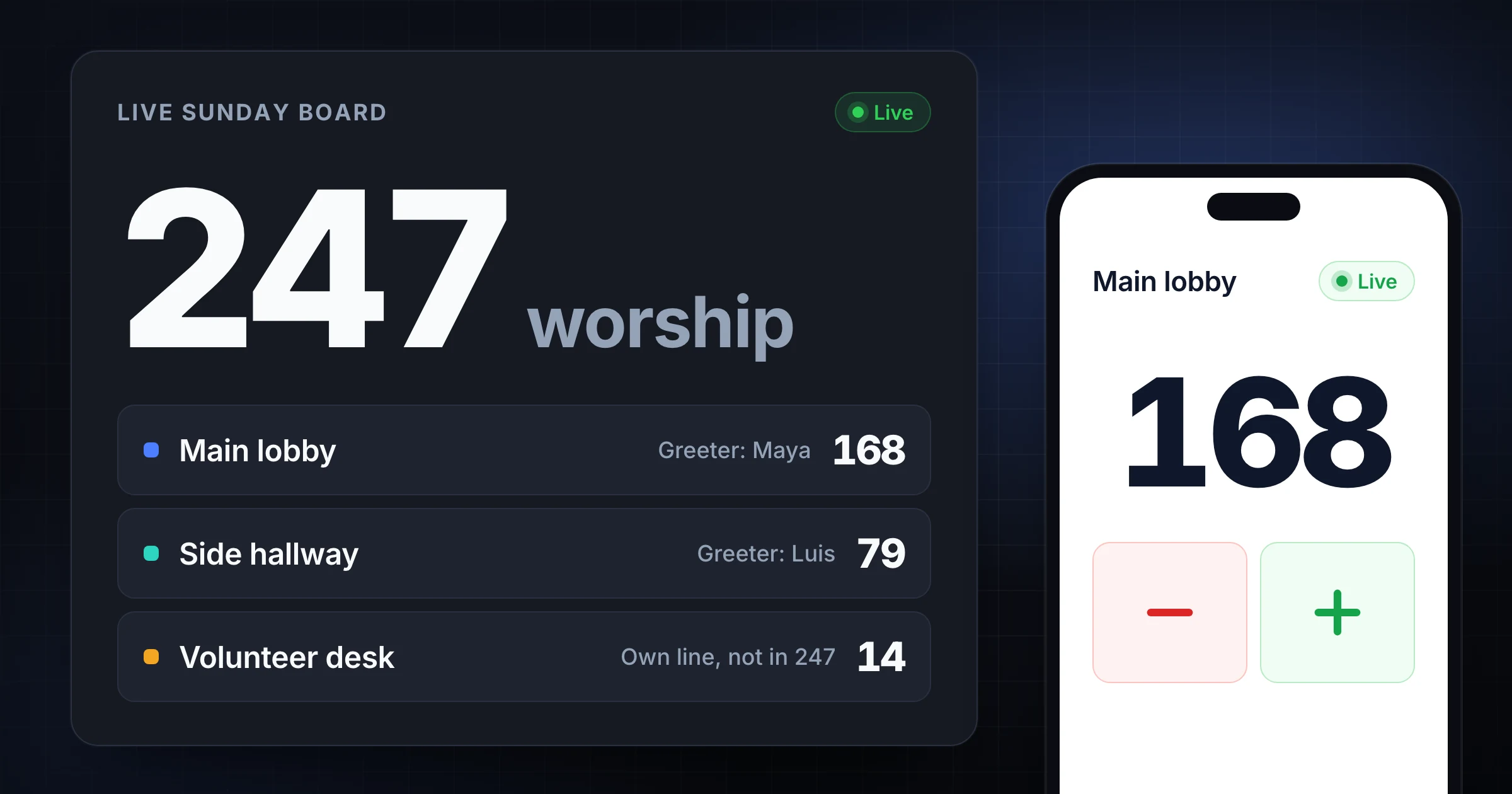
The sanctuary doors are covered. The side hallway is open. The volunteer desk is already checking people in. Someone still asks, five minutes before the bulletin is printed, "what is attendance?"
That is not a missing clicker. That is a missing Sunday SOP: named greeter roles at each door, a volunteer desk that is not the congregation total, and a handoff the next usher can say out loud.
This page is the program SOP for weekly services and midweek gatherings. It is not the church attendance counter guide (that page is what counts: worship vs kids vs online). It is not the multi-gate event headcount playbook (that page is a festival or one-off show: Gate A / Gate B, watch / slow / stop). This SOP is for the same church doors every Sunday.
Written by SnapCount (Lead Catalyst). SnapCount is a manual collaborative counter for web and iPhone. It is not a church management system, kids check-in or safeguarding product, or a fire-code / occupancy certificate. Confirm capacity and safety rules with the venue and the people running the service. Verify current plan details on pricing before you buy.
Quick ladder: Print the role card and door map → keep volunteer check-in on its own counter → prove Guest Mode on two devices → move to Pro only when the weekly record must survive as a saved export.
What done looks like before the bulletin
Done is not "we clicked a lot." Done is a number the count lead can explain before anyone asks for the bulletin line.
| Signal | Before doors | During the service | After the last song |
|---|---|---|---|
| Count rule | Written on the role card | Same at every door and at the desk | Quoted in the closeout |
| Congregation total | Main + Side + overflow only | Live, one board | Frozen before reset |
| Volunteer desk | Separate counter, separate owner | Never added into worship | Reported as its own line |
| Handoff | Phrases posted | Backup takes the line, not a second tap | Confirmed before anyone leaves |
| Second device | At least one greeter has joined | Lead sees both doors without a radio check | Join proof is part of closeout |
If radio says 247 in worship and the board says 247, the SOP is working. If they disagree, do not invent a third number. Find the missed door, the volunteer who was added into worship, or the person still using a private clicker.
For threshold tactics that stop two people from counting the same opening, use the busy entrance double-counting guide.
Pre-doors SOP (print this)
Do this before the first family reaches the lobby. Most of it is paper and names.
- Write the worship count rule in one sentence. Example: "Add 1 when a person crosses into the worship space. Do not add volunteer check-in here."
- List every opening that can become an entrance: main lobby, side hallway, balcony stairs, overflow connector, volunteer entrance.
- Mark each opening as counted, closed, exit-only, or desk-only.
- Fill the role card: greeter, backup, desk lead, and count lead.
- Name who owns volunteer check-in. That person does not own a sanctuary door.
- Open the shared board. Send the join link or QR to every greeter.
- Test every device from the actual door. Run a 60-second practice count.
- Agree who collects closeout numbers, where the bulletin figure goes, and that nobody resets first.
Print the role card. A new greeter should read it in under a minute.
| Role | Job | Does not do |
|---|---|---|
| Count lead | Watches the live congregation total, answers rule questions, freezes closeout | Count a busy door |
| Door greeter | Watches one threshold and taps that door's tile | Check in volunteers or solve lobby questions |
| Backup greeter | Takes the same threshold on a break, a long question, or a rush | Count the same door at the same time as the primary |
| Desk lead | Checks in volunteers on a separate counter | Add those taps to worship attendance |
| Problem solver | Directions, late families, accessibility | Own the count |
Fill names before doors, not during the first song:
| Opening | Status | Greeter | Backup | Direction | Tile |
|---|---|---|---|---|---|
| Main lobby | Open | Alex | Priya | In | Main / Gate A Entry |
| Side hallway | Open | Luis | Sam | In | Side / Gate B Entry |
| Overflow room | Open if used | Casey | Lee | In | Overflow (or a labeled extra counter) |
| Volunteer desk | Desk only | Jordan | Dana | Check-in | Volunteers ready (separate) |
| Balcony stairs | Open if used | Morgan | Riley | In | Balcony |
Worship rule: Cross into the worship space, add 1. Babies in arms: yes (keep it consistent).
Do not count: lobby-only, online viewers, volunteer check-in.
Volunteer rule: Add 1 when a scheduled volunteer is checked in and ready to serve.
Lead: Maya. Maya freezes the bulletin number.
Board: shared Guest session. Do not use a private clicker for the live total.
Keep one physical owner per tile. Two greeters tapping Main at once is how a live board becomes a second argument. The lead stays off the door. The desk stays off the sanctuary total.
Keep volunteer check-in out of the congregation total
The volunteer desk answers a staffing question: "Are the greeters, kids rooms, and tech team actually here?" Worship attendance answers a different question: "How many people are in the service?"
Mixing those numbers is how a church reports 310 one week and 274 the next without anyone leaving. The difference is often 36 volunteers who were added into worship on the first week and left out on the second.
| Counter | What a tap means | Goes into the bulletin worship line? |
|---|---|---|
| Main lobby | A person crossed into worship | Yes |
| Side hallway | A person crossed into worship | Yes |
| Overflow | A person is seated in overflow as part of the service | Yes, if that is your rule |
| Volunteer desk | A scheduled volunteer is checked in and ready | No. Report it as its own line |
| Kids check-in | A child is in an age-group room | No, unless your written rule includes them |
The volunteer check-in counter guide covers shift coverage and ready-to-work rules. This SOP only needs one hard line: desk taps never increment the congregation total.
If your campus report wants a "people on campus" number, add worship + kids + volunteers after closeout, as labeled lines. Do not ask a greeter to infer that sum at the door.
Handoff phrases that prevent double counts
Most Sunday double counts are polite. A greeter steps off the line to walk a family to seats. The backup starts tapping. The first greeter comes back and taps the same group.
Write the phrases on the role card. Say them out loud.
| Moment | Say this | Then do this |
|---|---|---|
| Backup takes the line | "I have Main. You are off count." | Only the backup taps. The primary pockets the phone. |
| Primary returns | "Handing Main back. Last tap was a family of four." | One owner. Confirm the live number before the next person crosses. |
| Desk asks a greeter for help | "Desk stays on volunteers. Main stays on worship." | Do not merge the counters to "help." |
| A group is missed | "Four missed at Main, adding four." | Correct once, while the memory is fresh. |
| Overflow opens | "Overflow is now counted. Main still counts the lobby only." | One new owner. Do not let Main "also watch" overflow. |
| Service is closing | "Freeze. Do not reset. Maya has the board." | Collect the closeout table before anyone leaves. |
If you need the broader team-sharing workflow (labels, permissions, reset rules), use how to share a tally counter with a team. The phrases above are the Sunday version.
Prove it free: Guest Mode
As of 7 Sep 2026 (changelog + pricing):
- Start a shared live count without an account
- Share by QR or link so a second device can join
- Guest sessions start with about 1 hour and can stay open while active up to about 4 hours
- On iPhone 1.1.3, you can save a guest session while signing up so counters arrive in your workspace rather than ending with the session
- Plus and minus stay available when the connection drops. Taps are held on the device and sent when the connection returns (changelog, 5 Sep 2026). Keep the page open until they are sent. That protects the count on this device during a blip. It does not invent perfect live alignment across every disconnected device until reconnect.
Two free boards fit this SOP:
| Template | Use it when |
|---|---|
| Church Attendance | A Sunday or midweek program with labeled service counters. Keep volunteers on their own tile. |
| Event Command Center | Two doors plus a live remaining number. Map Main to Gate A and Side to Gate B. Capacity remaining is an ops remaining figure, not a fire-code certificate. |
Event Command Center shipped 3 Sep 2026 as a free guest board: Gate A and Gate B entry and exit, with capacity remaining updating live. Use it when the lead needs remaining seats on one screen. Do not present remaining as occupancy approval, a fire-code signal, or a safety certification. Confirm the protected number with the venue and the authority having jurisdiction.
You can also start from the free church attendance counter or the attendance counter, then share the live session. For faith-specific workflow copy, see SnapCount for churches.
Proof steps: create Main, Side, and Volunteers → show the QR or send the link → join from a second phone → tap Main and confirm the lead sees it → tap Volunteers and confirm worship did not move → freeze the three numbers before reset.
That test answers the commercial question: did we stop adding the desk into the bulletin, and stop texting door totals during the first song?
When Pro and Enterprise are worth it
Stay on Guest while proving sync. Upgrade when the weekly numbers must outlive the session.
Pro ($15/mo or $129/yr) is the usual stop when you need:
- Saved counters and seats
- Export (CSV/JSON snapshots as on pricing)
- Week / month / year stats
- Daily CSV or JSON downloads, or scheduled email delivery of daily reports (shipped 6 Sep 2026)
The Multi-Door Capacity template is a Pro board for a recurring saved multi-door setup. Use it after Guest has already proved Main / Side / remaining on a free session, and only when the same Sunday layout needs to live in an organization. It is not a fire-code tool.
Enterprise ($39/mo or $349/yr) adds event history, activity logs, and locks, plus threshold / capacity alerts in the dashboard inbox and by email (shipped 5 Sep 2026). Use Enterprise alerts only when a named admin should be notified that a counter or grouped occupancy hit a threshold you set. That is an inbox and email signal. It is not a fire-code or capacity certificate.
Pro and Enterprise can also be paid once with Lifetime, $199 for Pro or $399 for Enterprise, with no renewal. Existing Team $49 and Enterprise $79 lifetime buyers keep access as Lifetime (legacy). Members join free on paid organization plans. Re-check pricing on publish day.
If the next step is a file for the office, follow the count history export checklist before anyone resets.
Closeout checklist
Collect these numbers before anyone resets, while the greeters still remember the rush:
- Live congregation total on the board (Main + Side + overflow, per your rule).
- Per-door inbound counts.
- Volunteer desk total, labeled separately.
- Kids ministry total, if you track it (still separate unless your written rule says otherwise).
- Known exceptions: late ushers counted twice, a group that entered through a closed door, a missed family of five.
An illustrative closeout (not a customer result):
| Source | Count |
|---|---|
| Main lobby | 168 |
| Side hallway | 79 |
| Overflow | 0 |
| Reported worship attendance | 247 |
| Volunteer desk (separate) | 14 |
| Kids check-in (separate) | 41 |
Notes belong next to the numbers: "Main had a rush during the first song. Desk checked in 14. Worship does not include the 14." Those notes protect the four-week trend.
Guest sessions are temporary. If the office needs a file next week, export or copy the table before the session ends.
Ten-minute practice run
Run this on Saturday, not during the first song.
| Minute | Action |
|---|---|
| 0 to 2 | Write the worship rule and the volunteer rule on the role card. Name the lead. |
| 2 to 4 | Fill Main, Side, and desk owners. One owner per tile. |
| 4 to 6 | Start a free Guest Mode session. Create Main, Side, and Volunteers. Open the QR or link. |
| 6 to 8 | Second device joins. Tap Main once. Confirm worship moved. Tap Volunteers once. Confirm worship did not move. |
| 8 to 10 | Practice one handoff phrase. Say who freezes the bulletin number. Say that nobody resets first. |
If the same SOP repeats every Sunday and the office needs saved counters, seats, stats, or a daily email, open pricing. Choose Pro for the record. Enterprise only for history, locks, or threshold alerts.
Platform note: SnapCount has an iPhone app and works in any web browser. There is no Android app: on Android phones, use it in the browser (Chrome can add it to the home screen).
Frequently asked questions
How is this SOP different from the church attendance counter guide?
The church attendance counter guide (and the matching tool) is about what counts: worship vs kids vs volunteers vs online. This page assumes you already wrote that rule. It is the Sunday operating card: greeter roles, a door map, desk separation, handoff phrases, and a Guest to Pro ladder.
How is this different from the multi-gate event headcount playbook?
The multi-gate playbook is for a festival or one-off show: Gate A / Gate B, watch / slow / stop, and a five-number ticket reconcile. This SOP is for a weekly program. You still may open Event Command Center and map Main to Gate A. You do not run it as a concert capacity drill, and remaining capacity is still not a fire-code certificate.
When should a church move from Guest Mode to Pro?
Guest is enough to prove live door sync and a separate volunteer desk. Pro ($15/mo or $129/yr) is worth it when the weekly record must survive as a saved counter with seats, export, week/month/year stats, and daily CSV or JSON downloads or scheduled email delivery. Event history, activity logs, and locks remain Enterprise ($39/mo or $349/yr), along with threshold alerts in the dashboard inbox and email. SnapCount still does not replace a CMS, kids security system, or occupancy certificate.
Print the card. Prove the board. Keep the desk separate
The missing piece on most multi-door Sundays is not another usher. It is a written SOP: who taps which door, who owns the volunteer desk, what to say at a handoff, and which number goes in the bulletin.
Use Church Attendance or Event Command Center to put the SOP on a live board. Count immediately on the church attendance counter or the attendance counter. Open pricing only when the weekly record has to last.
Topics: church attendance, multi-door, volunteer, SOP, guest mode
About SnapCount Team
The SnapCount Team builds and tests shared counting workflows for events, inventory, attendance, and field work. We review these articles when product workflows change and link to the tools we use to validate them.
Contact SnapCount support