
Short answer: pallet grades describe the condition and repair history of a used pallet, not its size. On the standard 48x40 GMA pallet, Grade A (also called #1) has original stringers with no plugs, splits, or companion stringers. Grade B (#2) has been repaired, usually with plugged or companion stringers. Combo or remanufactured pallets are rebuilt from parts of several pallets. There is no governing body for these grades, so every yard and buyer should write down their own inspection rules.
If you run a pallet yard, the grade is also how you count the day: how many A's each builder made, how many B's, and what the yard has to sell. This guide covers both: what each grade means, how yards grade on the sort line, and how to keep a per-builder count by grade without adding up tally sheets after the shift.
What pallet grades actually measure
Every common grade below refers to the same pallet: the 48 by 40 inch, four-way stringer pallet often called a GMA pallet, after the Grocery Manufacturers Association specification that made it the default in US grocery and retail freight.
The grade answers one question: how much life and how much repair does this pallet have? It does not change the footprint. A Grade A and a Grade B pallet both fit the same rack, truck, and pallet jack. What changes is how they look, how a receiver will treat them, and what they sell for.
That is why grading matters to three people at once:
- The buyer, who needs pallets that a retailer or food plant will accept at the dock.
- The yard, which prices and stacks inventory by grade.
- The builder or sorter, who is often paid or measured by how many pallets of each grade they produce.
The common pallet grades
Names vary by region and by yard. This table shows the terms most buyers and yards use for a 48x40 stringer pallet.
| Grade | Also called | What it usually means | Typical use |
|---|---|---|---|
| Premium A | 1A, Premium #1 | Original stringers, clean, uniform boards, little visible wear | Customer-facing retail and grocery loads where appearance is checked |
| Grade A | #1, A's | Original stringers with no plugs or companion stringers; sound deck boards | Retail, food and beverage, outbound shipments to customers with pallet rules |
| Grade B | #2, B's | Repaired: plugged or companion stringers, replaced boards, more wear | Internal moves, warehouse storage, manufacturing, receivers without pallet rules |
| Combo / remanufactured | Remans, combo pallets | Rebuilt from salvaged parts of several pallets, mixed lumber | Budget and one-way internal use |
| New | New 48x40 | Built from new lumber to a spec | Spec-required, pharma, or export loads |
| Heat treated | HT, ISPM-15 stamped | Any grade treated and stamped for international shipping | Exports; not required for domestic freight |
Two points trip people up:
- "#1" and "Grade A" usually mean the same thing, and so do "#2" and "Grade B". Some yards also use "1A" or "Premium A" for the very best #1 pallets.
- Heat treatment is not a grade. An HT stamp says the wood was treated for export under ISPM-15. A Grade B pallet can be heat treated, and a Grade A pallet can lack the stamp.
Why "Grade A" from one yard may not match another
There is no standards body that enforces recycled pallet grades. Millwood's pallet grading guide notes that the legacy GMA recycled grades (1A, 1, and 2) have no governing body, so the definitions are not applied the same way everywhere.
In practice that means:
- Buyers should ask for the inspection criteria, not just the grade name.
- Yards should write their grading rules down and show them to every sorter and builder, so a pallet that is an A on Monday is still an A on Friday.
- Counts by grade are only comparable when everyone grades by the same rules.
How yards grade pallets on the sort line
Most yards inspect each pallet as it comes off the truck or off the dismantling line and drop it into a stack by grade. A practical inspection covers:
| Check | Grade A (#1) | Grade B (#2) |
|---|---|---|
| Stringers | Original, unbroken, no plugs or companions | Plugged, plated, or companion stringer allowed |
| Deck boards | Sound, full width, no missing boards | Replaced or patched boards allowed |
| Lead boards | Intact | May be replaced |
| Nails | No protruding nails | No protruding nails |
| Condition | Clean, dry, uniform color | Wear and mixed color accepted |
| Odor and contamination | None | None |
Anything that fails both columns goes to repair, to combo builds, or to grinding. Whatever your exact rules, keep them to a short list a sorter can apply in a few seconds per pallet.
Why yards count by grade and by builder
On paper, grading ends with a stack. Operationally, it is the start of three questions the yard owner asks every day:
- How many of each grade did we make? That is sellable inventory: A's for the retail and grocery buyers, B's for internal-use customers.
- How many did each builder or sorter produce? Many yards pay builders by the piece, often with a different rate per grade, so the per-builder count is the pay record. (See piece rate pay for how that pay is usually worked out.)
- Where does each builder stand right now? A builder who can see their own count during the shift does not wait until Friday to find out the week was short.
Most yards still answer these with a paper tally sheet per builder: a column per grade, tally marks through the day, and someone adding it all up after the shift. It works, but the totals arrive late, and an unreadable sheet turns into an argument at payday.
How to count each builder's pallets by grade, live
The same tally sheet can run on the phones the yard already has. With SnapCount, the setup mirrors the paper:
- Make a group for each builder, named the way you write it on the sheet today.
- Give every group the same counters, one per grade: A's, B's, combo, or whatever your yard sorts.
- Each builder taps a pallet in as it is finished, on their own phone or a shared phone at the station. A tap adds 1. On Pro you can set the step, so one tap adds a full stack.
- The Totals tab adds each grade up across every builder as anyone counts. Open a grade to see how much each builder added.
- On Pro, each day is kept. Export the day's totals per builder and per grade as CSV or JSON, or have them emailed to the office on a schedule.
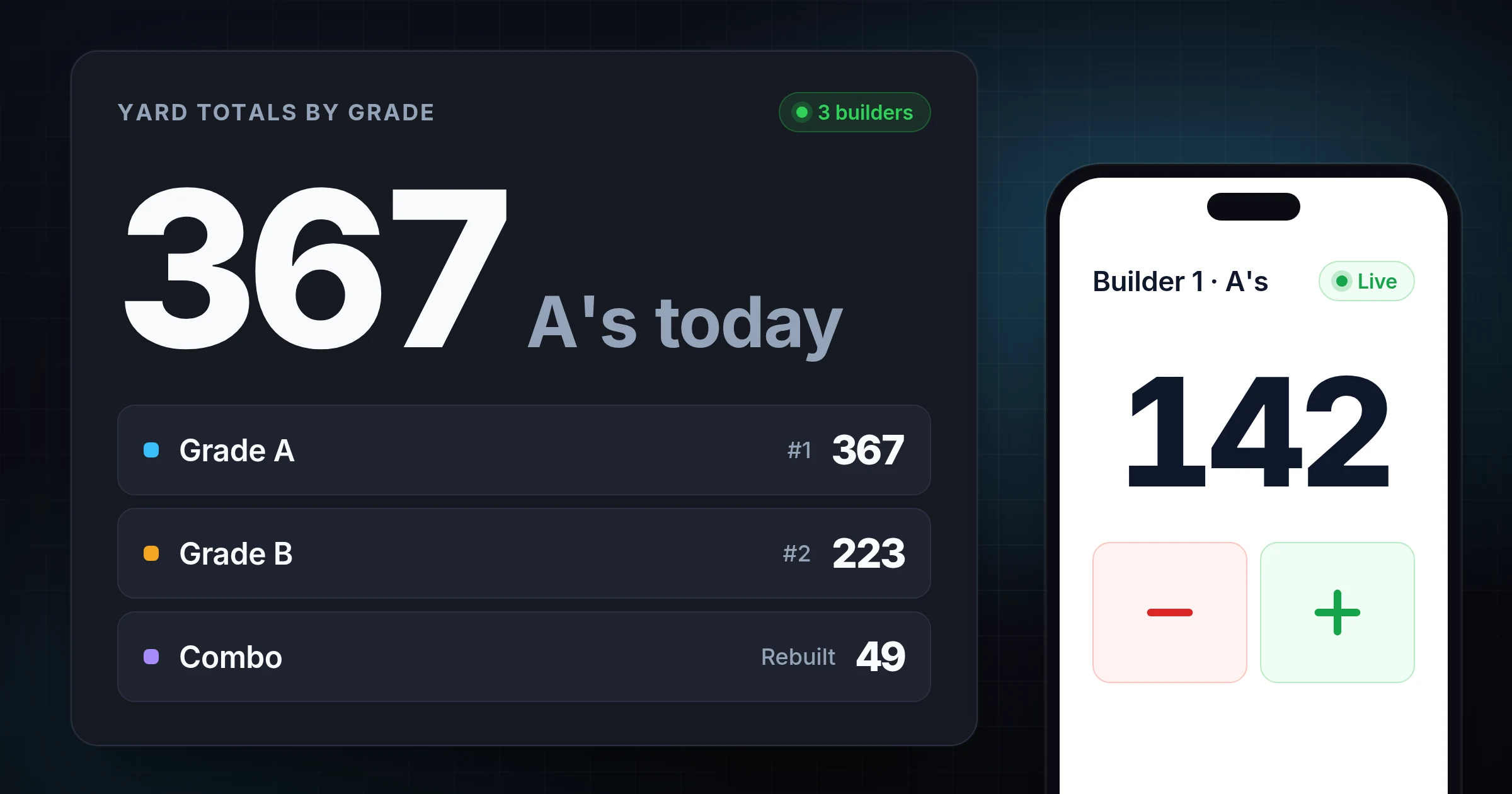
Here is what an illustrative day looks like on the yard board:
| Builder | A's | B's | Combo | Total |
|---|---|---|---|---|
| Builder 1 | 142 | 61 | 18 | 221 |
| Builder 2 | 128 | 74 | 9 | 211 |
| Builder 3 | 97 | 88 | 22 | 207 |
| Yard total | 367 | 223 | 49 | 639 |
On paper, that bottom row is somebody's job after the shift. In a live count, it is already there.
The free guest count starts with one counter per builder. Save it into an account to add a counter per grade and keep each day's numbers. For the full yard setup, see counts per builder and grade for pallet yards. If the yard is not ready for phones, print a sheet with the free tally sheet generator and move it onto phones later.
Common grading and counting mistakes
- Grading by feel. Without written rules, two sorters put the same pallet in different stacks, and the grade counts stop meaning anything.
- Counting stacks, not pallets, without saying so. If a builder counts a stack of 15 as one mark, write that down, or set the step so one tap adds 15.
- Totaling only at the end of the week. A miscount found on Friday cannot be checked against Tuesday's stacks.
- Mixing HT with grade. Track heat treated pallets as their own counter if buyers ask for them, rather than a separate grade.
- One sheet for everyone. A shared sheet hides who made what, which is the number pay depends on.
Evidence and limitations
The grade definitions above summarize common usage published by pallet suppliers and the legacy GMA terms; they are not a standard, and your buyers' rules win. The yard example is illustrative, not customer data.
SnapCount counts by manual taps only: no scales, scanners, sensors, or cameras. It records what your team taps. It does not grade pallets, and it does not calculate pay.
Updated October 12, 2026.
Frequently asked questions
What is a Grade A pallet?
A Grade A pallet, also called a #1 pallet, is a used 48x40 stringer pallet with its original stringers, no plugs or companion stringers, sound deck boards, and no protruding nails. It is the grade most retail and grocery receivers expect.
What is the difference between #1 and #2 pallets?
A #1 (Grade A) pallet has original, unrepaired stringers. A #2 (Grade B) pallet has been repaired, usually with plugged or companion stringers or replaced boards. Both are the same 48x40 size; #2 pallets cost less and are used where appearance does not matter.
What is a GMA pallet?
A GMA pallet is the 48 by 40 inch, four-way stringer pallet built to the Grocery Manufacturers Association specification. It is the most common pallet in US grocery and retail freight, and the recycled grades (A, B, #1, #2) usually refer to it.
What is a combo pallet?
A combo or remanufactured pallet is rebuilt from salvaged parts of several pallets. It is usually the lowest cost option and is used for internal or one-way shipments.
Are pallet grades standardized?
No. There is no governing body for recycled pallet grades, so a Grade A from one yard may not match another's. Ask for the yard's written inspection criteria, and write your own down if you sort pallets.
How do pallet yards count pallets by grade?
Most yards keep a tally sheet per builder with a column per grade, then add the sheets up after the shift. A live shared count does the same on phones: a group per builder, a counter per grade, and the totals per grade across the yard added up as builders tap.
Topics: pallet grades, GMA pallet, grade A pallets, pallet recycling, pallet builder tally
About SnapCount Team
The SnapCount Team builds and tests shared counting workflows for events, inventory, attendance, and field work. We review these articles when product workflows change and link to the tools we use to validate them.
Contact SnapCount support