
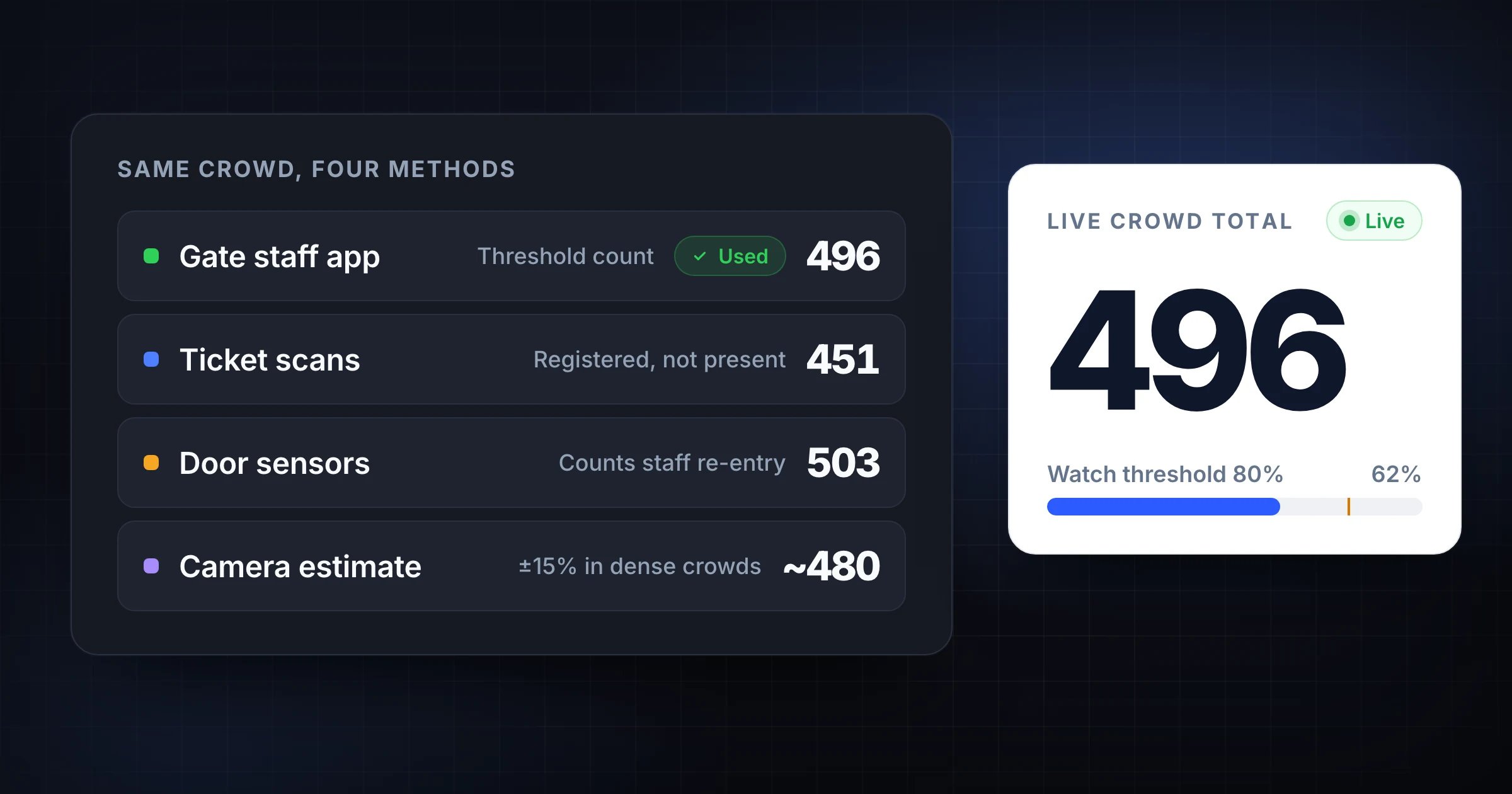
Crowd counting methods range from a volunteer with a clicker to camera analytics, door sensors, ticket scans, and shared counting apps.
The right method depends on the decision you need to make. A venue checking room capacity needs a live occupancy number. A church reporting Sunday attendance needs a consistent weekly total. A festival team needs gate flow by entrance. A conference organizer may need ticket scans, room counts, and overflow triggers at the same time.
Do not start by buying hardware. Start by choosing the count that protects the event. Then pick the simplest method that gives you a trustworthy number while people are moving.
If you already have multiple entrances, SnapCount's event counting workflow gives each gate a shared live total. If you are still planning the limit, use the room capacity calculator guide first, then use this comparison to choose the crowd counting method for event day.
Start with the crowd count question
"How many people are here?" sounds like one question. In event operations, it is usually several questions.
Before you choose a method, decide which number matters:
| Count question | Example use | Best starting method |
|---|---|---|
| How many people entered? | Final attendance report | Inbound count or ticket scans |
| How many people are inside right now? | Capacity and safety decisions | Inbound and outbound live count |
| Which entrance is busiest? | Gate staffing and signage | One counter per entrance |
| How many people used this room? | Breakout, class, or overflow planning | Room-level attendance count |
| How many people passed through over time? | Retail-style traffic trend | Sensor or camera analytics |
| How many registered attendees checked in? | Paid admission or badges | Ticketing or check-in system |
The method follows the question. Ticket scans can be excellent for registration history and weak for current occupancy. A camera can track a doorway but may not know whether a person should count against a service, staff, vendor, or attendee rule. A manual counter can be accurate at a gate but poor for an unattended hallway.
Write the target number in plain language before doors open. For example: "Current occupancy inside the fenced area, excluding staff who remain outside the gate." That sentence will do more for accuracy than an expensive tool attached to an unclear rule.
Method 1: Manual clickers
Manual clickers are the oldest crowd counting method because they are cheap, fast, and easy to teach.
They work well when one person is counting one controlled threshold. A volunteer stands at a door, clicks once per person, and records the final total when entry slows.
| Best for | Watch out for |
|---|---|
| One entrance or one room | No live shared total |
| Small events and backup counts | Easy to reset or misplace |
| Short entry windows | Hard to combine across gates |
| Teams with no device setup | No context, notes, or history |
Clickers fail when the operation needs coordination. If 4 gates each have a clicker, the lead does not know the live total until someone collects the numbers. If re-entry matters, the team needs a second clicker or a separate subtraction process. If a counter is interrupted, there is no audit trail.
Use clickers when the count is low risk, local, and short. Keep a written rule card next to the clicker so every volunteer counts the same way.
Method 2: Paper tally sheets
Paper tally sheets are useful when you need a visible backup record.
They are slower than clickers but better for grouped counts, room sections, and post-event reconciliation. A paper sheet can separate adults, children, staff, vendors, and overflow rooms without needing a device.
| Best for | Watch out for |
|---|---|
| Backup count records | Slow during rushes |
| Small classes or rooms | Easy to misread after the event |
| Category counts | No live total |
| Volunteer teams with no phones | Manual math errors |
Paper works best as a support method, not the main live count. For example, a church might use SnapCount at sanctuary doors and paper room sheets in kids ministry. A conference might use ticket scans for badges and paper notes for exceptions, such as speakers, staff, and walk-up guests.
If you use paper, reconcile before the team leaves. A tally mark that looks obvious at 11 a.m. may be unclear on Monday morning.
Method 3: Shared counting apps
Shared counting apps are the practical middle ground for many events.
They keep the simplicity of manual counting but remove the biggest clicker problem: separate totals. Each entrance can count from a phone, tablet, or laptop while the event lead watches one live number.
This is the method to consider when you have multiple entrances, volunteers, capacity thresholds, overflow rooms, or re-entry.
| Best for | Watch out for |
|---|---|
| Multi-gate event headcount | Needs a clear setup before doors open |
| Churches and venues with overflow rooms | Volunteers still need count rules |
| Capacity-sensitive rooms | Device batteries and connectivity matter |
| Fast event-day decisions | Someone must own the live total |
The key advantage is operational visibility. The main gate, side entrance, VIP door, and overflow room can all contribute to one shared total. If the count reaches 80% of practical capacity, the lead can open overflow or slow entry before the room is uncomfortable.
Use a shared app when the count changes decisions during the event. The attendance counter guide shows the setup for doors, rooms, and services. The event headcount guide covers larger gate-based events with capacity thresholds and reconciliation.
Method 4: Ticket scans and check-in systems
Ticket scans are strong when you need to know who checked in.
They are common at conferences, paid events, schools, and performances. They connect attendance to registrations, badges, payments, or names. That makes them useful for reporting, no-shows, and follow-up.
They are not always enough for crowd counting.
| Best for | Watch out for |
|---|---|
| Paid admission and badge pickup | May miss staff, vendors, and walk-ins |
| Named attendance records | Does not always track exits |
| Registration reconciliation | Side doors can bypass scans |
| No-show reporting | Current occupancy may be overstated |
Ticket scans answer, "Who checked in?" Crowd counts often answer, "How many bodies are in the space right now?"
Those can be different numbers. A festival may have 900 scans but 1,030 people inside because staff, vendors, children, performers, and paper-list guests entered too. A conference room may have 120 badge scans but 95 people inside after 25 left for another session.
Use scans as one source of truth for registration. Use a crowd count when capacity, flow, or live operations matter.
Method 5: Door sensors
Door sensors count movement through a doorway without a person standing there.
They can be useful for long-duration traffic patterns, retail footfall, libraries, museums, and venues with unattended entrances. They reduce labor and can collect trend data every day.
| Best for | Watch out for |
|---|---|
| Long-running entrance traffic | Hardware cost and setup |
| Unattended doors | Placement affects accuracy |
| Trend reporting by hour or day | May count staff and repeated movement |
| Facilities planning | Usually needs calibration |
Sensors are less useful when the count rule depends on context. A sensor does not know whether a person is a paid attendee, volunteer, child in arms, delivery driver, performer, or staff member unless the entrance process separates those groups.
Use sensors when traffic is steady, the threshold is fixed, and trend data matters more than event-day judgment. For a one-day volunteer-run event, sensors are often more setup than the problem requires.
Method 6: Camera and video analytics
Camera analytics can estimate crowds, count people crossing zones, and monitor density in larger spaces.
This can be valuable for venues, transport hubs, large campuses, retail locations, and security operations. It can also be expensive, sensitive, and dependent on camera placement, lighting, privacy rules, and model accuracy.
| Best for | Watch out for |
|---|---|
| Large spaces and flow analysis | Cost, privacy, and consent |
| Density monitoring | Lighting and occlusion issues |
| Security or operations centers | Accuracy can drop in dense crowds |
| Retrospective video review | May not replace live gate decisions |
The National Institute of Standards and Technology has published public safety video analytics research showing why automated video analysis is useful for large-scale situational awareness. Video analytics can be powerful, but it is not magic. Crowds block sight lines. Groups overlap. Lighting changes. Cameras may see movement without understanding your event rules.
Use cameras when you need a broader view than a gate counter can provide. Keep manual or app-based counts for the official event number unless your camera system has been tested in the exact environment where you will use it.
Method 7: Visual estimates
Visual estimates are sometimes unavoidable. They should not be your primary method when the number affects safety, staffing, or reporting.
Estimates can help when you need a fast read of a room, line, or open area. They are useful as a secondary check: "Does the live count of 380 look plausible?" They are weak as the only record.
| Best for | Watch out for |
|---|---|
| Quick situational awareness | High bias and inconsistency |
| Open spaces without gates | Poor audit trail |
| Sanity checks against another count | People cluster unevenly |
| Early planning before doors open | Not enough for capacity decisions |
If you must estimate, use zones. Divide the space into sections, estimate each section, then add them. A single whole-room guess is usually worse than 5 smaller section estimates.
Use estimates for awareness. Use counted entrances, scans, sensors, or cameras for decisions that need accountability.
How to choose the right method
Most teams do not need one method. They need a primary method and a backup.
Use this decision table:
| Situation | Recommended setup |
|---|---|
| One small room, one door | Manual clicker or shared app |
| Multi-door church service | Shared app by door, kids check-in separate |
| Venue near capacity | Shared app with in and out counts, plus thresholds |
| Paid conference | Ticket scans for names, shared room counts for occupancy |
| Outdoor festival | Gate counters, re-entry counters, ticket scans, and reconciliation |
| Retail or museum trend tracking | Sensors or camera analytics, reviewed over time |
| Uncontrolled open crowd | Zone estimates plus camera or staff observation |
Choose the simplest method that answers the question with enough accuracy. Do not use a camera system when the issue is 3 volunteers counting separate doors. Do not use one clicker when the issue is current occupancy across 6 entrances.
Build a crowd counting plan
A good crowd counting method still needs a plan.
Use this setup before doors open:
- Define the count: attendance, current occupancy, room count, or gate flow.
- Decide who counts: attendees, staff, vendors, children, volunteers, and re-entry.
- List every entrance, exit, room, and overflow area.
- Assign a counter and backup to each controlled threshold.
- Pick the method for each threshold.
- Set watch, slow, hold, and overflow thresholds.
- Test devices, clickers, scanners, or sensors from the actual location.
- Reconcile against ticket scans, room sheets, or exception notes before the team leaves.
If capacity is part of the decision, estimate the space first with the event capacity calculator. Then count toward that limit during the event.
Common crowd counting mistakes
Most failures come from mismatched methods, not bad counters.
| Mistake | Better approach |
|---|---|
| Choosing hardware before defining the count | Write the exact number you need first |
| Treating ticket scans as current occupancy | Count exits or room entry when capacity matters |
| Giving each entrance a private clicker | Use a shared total or reconcile on a fixed schedule |
| Counting without a re-entry rule | Decide how exits and returns affect the number |
| Asking counters to solve guest problems | Pair each counter with a backup or helper |
| Ignoring staff and vendors | Decide whether they count before doors open |
| Waiting until after the event to reconcile | Compare numbers while exceptions are fresh |
The method should make the event easier to run. If it adds setup but does not improve decisions, simplify it.
Frequently asked questions
What is the most accurate crowd counting method?
The most accurate method depends on the environment and the count definition.
A controlled doorway can be counted accurately with trained staff and a shared app. Long-term entrance traffic may be better with calibrated sensors. Large open areas may need cameras plus staff observation. Accuracy drops when the team has not defined who counts, where the threshold is, or how re-entry works.
Are ticket scans the same as crowd counting?
No. Ticket scans record check-ins, while crowd counting records people in a space or passing a threshold.
Ticket scans can miss staff, vendors, children, walk-ins, paper-list guests, and side-door entries. They may also overstate current occupancy if people leave after checking in. Use scans for registration history and a live crowd count for event operations.
How do you count a crowd at multiple entrances?
Assign one counter to each entrance and combine those counts into one live total.
Each entrance needs the same count rule, a named counter, a backup, and clear instructions for inbound or outbound movement. The event lead watches the combined number and makes threshold calls when the crowd approaches capacity.
When should you use sensors or cameras?
Use sensors or cameras when you need unattended traffic trends, density monitoring, or coverage across a space where manual threshold counting is not practical.
For one-time events, volunteer-run services, and multi-gate entry, a shared counting app is often simpler. Hardware is strongest when the same entrance or area needs repeated measurement over time.
What is the best low-cost crowd counting setup?
The best low-cost setup is usually a shared counting app plus a short rule card.
Give each entrance a counter and backup, count at the threshold, set capacity triggers, and reconcile before staff leave. Keep paper tally sheets or clickers as backup if connectivity is uncertain.
Topics: crowd counting methods, crowd counting, event attendance, people counting
About SnapCount Team
The SnapCount Team builds and tests shared counting workflows for events, inventory, attendance, and field work. We review guides when product workflows change and link to the tools we use to validate them.
Contact SnapCount support