
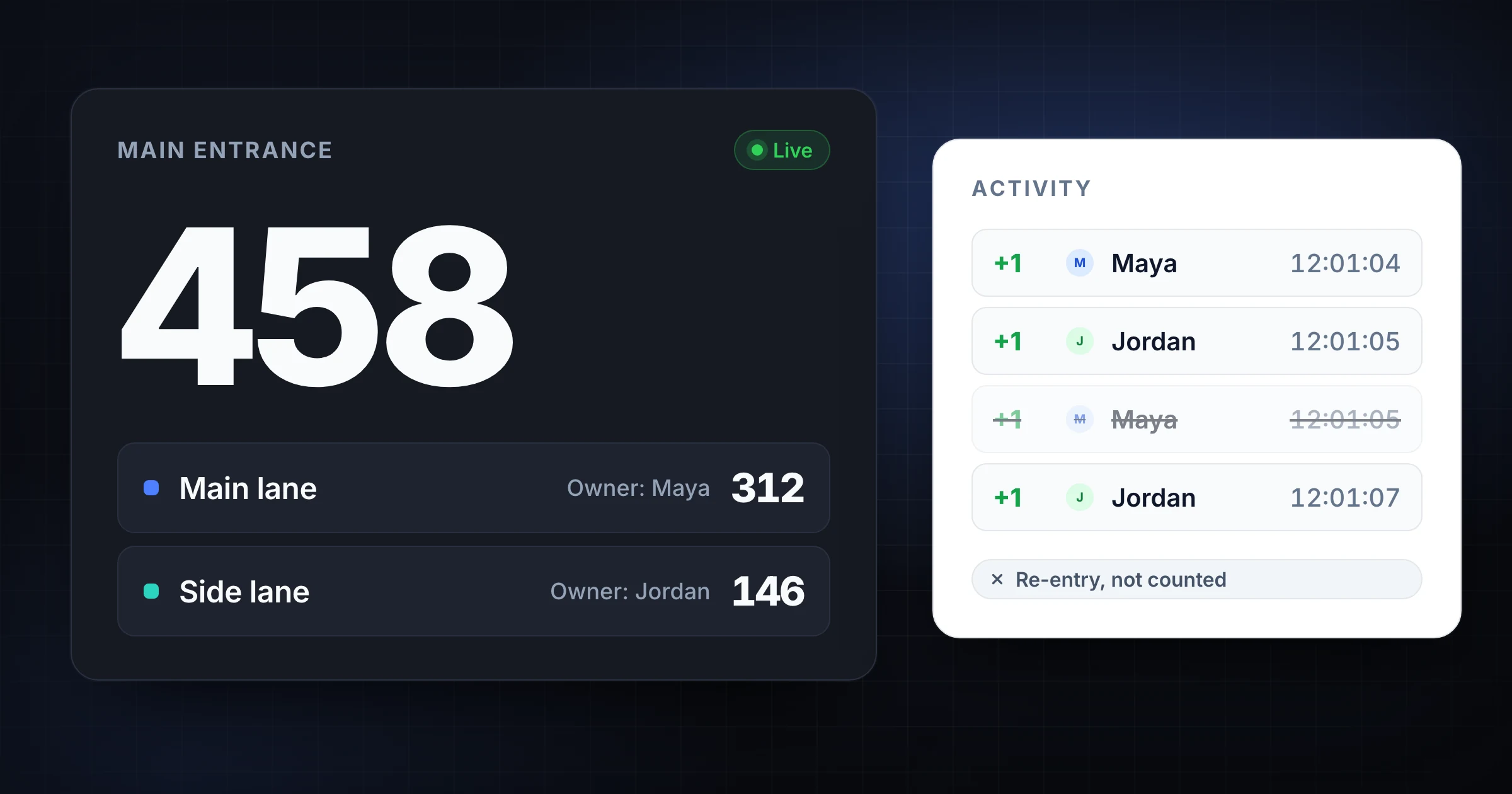
Double-counting at a busy entrance usually starts with good intentions.
Two volunteers both see the same group. A parent steps across the doorway to ask a question and comes back. A side door turns into an unofficial entrance. Someone counts the line instead of the threshold. The number rises fast, but the total is not trustworthy.
The fix is a better entrance workflow, not a more expensive clicker.
Use SnapCount's attendance counter when multiple people need to count entrances and share one live total. If you are planning a larger event, start with the event headcount guide and use the room capacity calculator to set capacity thresholds before doors open.
Count the threshold, not the crowd
The simplest double-counting rule is this: count only when a person crosses a defined threshold.
The threshold can be:
- A doorway.
- A rope line.
- A ticket table.
- A stanchion opening.
- A gate scanner.
- A marked floor line.
- The edge of a seating area.
Do not count people standing in line. Do not count people approaching the entrance. Do not count people who turn around before entering.
At busy entrances, the threshold gives the counter one visual job. A person crosses the line, add 1. The person has not crossed the line, do not add 1.
Write the threshold rule in plain language:
Count each attendee once when they cross the blue rope into the hall. Do not count people waiting in the lobby or asking questions at the table.
That rule prevents most overlap.
Give each entrance one owner
Busy entrances can have several helpers, but only one person should own the count for that threshold at a time.
Use this role split:
| Role | Job |
|---|---|
| Counter | Watches the threshold and updates the count |
| Backup counter | Takes over during breaks or rushes |
| Problem solver | Answers questions, checks tickets, redirects people |
| Lead | Watches live totals and resolves rule questions |
The counter should not also solve registration problems. Every long conversation at the entrance creates a chance to miss or double-count a group.
For a volunteer-run event, the setup might look like this:
| Entrance | Counter | Backup | Problem solver |
|---|---|---|---|
| Main door | Alex | Priya | Jordan |
| Side gate | Morgan | Sam | Riley |
| Volunteer entrance | Casey | Lee | Dana |
The backup is there to take over, not to count the same threshold at the same time. If two people need to count one very wide entrance, split the entrance into physical lanes and label each lane separately.
Split wide entrances into lanes
One person can count a normal doorway. One person should not count a wide lobby opening where people enter from several angles.
When the entrance is too wide, split it into lanes:
| Lane | What to count |
|---|---|
| Left stanchion | People crossing through the left opening |
| Right stanchion | People crossing through the right opening |
| Accessible lane | People entering through the accessible gap |
| VIP table | Badge holders who bypass the main line |
Each lane gets one counter. The lead watches the shared total.
Do not let counters count the same physical space. If the lanes overlap, the totals will overlap too. Use cones, tape, ropes, tables, or staff positioning to make the split visible.
Decide how re-entry works
Re-entry is one of the biggest sources of double-counting.
Choose one policy before the event:
| Re-entry policy | When to use it | Counter rule |
|---|---|---|
| No re-entry tracking | Final attendance only, low capacity risk | Count each person on first entry only |
| Wristband re-entry | Attendees leave and return through one gate | Subtract on exit, add on return if tracking occupancy |
| Exit-only tracking | Capacity matters, exits are controlled | Subtract when people leave the controlled area |
| Ignore quick threshold noise | People step out briefly for questions | Do not count immediate out-and-back movement |
For current occupancy, you need exits. For total attendance, you usually do not count the same person twice just because they left and came back.
Make the rule visible to staff:
Re-entry rule: wristband returns do not increase total attendance.
Occupancy rule: subtract when they leave; add when they return.
Quick doorway questions: ignore if the person steps back in immediately.
That last line matters. A person who crosses the threshold to ask where the restroom is should not become two attendance events.
Use a pause phrase during rushes
Busy entrances get noisy. Counters need a short phrase that pauses changes without blame.
Use phrases like:
- "Hold count."
- "Missed group."
- "Backup take over."
- "Correction plus five."
- "Door closed."
The phrase should tell the lead what happened quickly. A missed group is not a failure. It is information the team needs while the memory is fresh.
For large groups, have the counter say the number out loud before tapping: "Six crossing." Then add 6. Saying it out loud gives the backup a chance to catch obvious mistakes.
Keep side doors from becoming hidden entrances
The cleanest main-door workflow fails if people enter through unassigned side doors.
Before doors open, list every possible entry point:
- Main entrance.
- Side door.
- Staff door.
- Kitchen or vendor entrance.
- Emergency door.
- Patio gate.
- Elevator lobby.
- Overflow room connection.
Then decide whether each one is open, closed, exit-only, staff-only, or counted.
| Door | Status | Count rule |
|---|---|---|
| Main entrance | Open | Count attendee entries |
| Side door | Open after 6 p.m. | Assign separate counter |
| Staff door | Staff only | Track staff separately |
| Patio gate | Exit-only | Subtract only if occupancy matters |
| Emergency door | Closed | Do not use for entry |
If a door changes status during the event, tell the count lead immediately. The count history should show when the side entrance opened or closed.
Reconcile before reset
Even a good process needs a closeout check.
Before anyone resets a counter, compare:
| Source | What to review |
|---|---|
| Live entrance counts | Main, side, VIP, staff, overflow |
| Ticket scans or registration | Paid and named attendees |
| Known exceptions | Staff, vendors, speakers, walk-ins |
| Door notes | Side door opened, scanner failed, rush periods |
| Capacity notes | Any threshold warnings or pauses |
If two entrances have odd numbers, ask while staff are still on site. "Did Gate B count volunteers?" is much easier to answer 10 minutes after doors close than the next morning.
If you need a final report, read the count history export guide before resetting anything.
Busy entrance checklist
Use this checklist before doors open:
- Mark the threshold where counting happens.
- Assign one counter per threshold or lane.
- Assign a backup who is not also counting the same people.
- Give problem-solving work to someone other than the counter.
- Decide whether staff, vendors, children, and volunteers count.
- Decide how exits and re-entry work.
- List every side door and its status.
- Use short correction phrases during rushes.
- Export or record the final count before reset.
Most double-counting is preventable. The entrance needs a visible boundary, one owner, and a rule for people who move in ways the counter did not expect.
Frequently asked questions
What causes double-counting at event entrances?
Double-counting usually happens when two counters watch the same threshold, people leave and return without a re-entry rule, or staff count the line instead of the entrance.
It can also happen when side doors become unofficial entrances.
Should two people count the same busy entrance?
Two people should not count the same threshold at the same time.
If an entrance is too busy for one counter, split it into clear lanes and assign one counter to each lane.
How do I count re-entry without inflating attendance?
Separate total attendance from current occupancy.
For total attendance, do not add the same person again when they return. For current occupancy, subtract when they leave and add when they return.
What should the counter do if they miss a group?
They should call it out immediately and make a correction while the group size is still fresh.
Guessing later creates more error than a quick same-moment correction.
Topics: double counting, busy entrances, attendance counter, event headcount
About SnapCount Team
The SnapCount Team builds and tests shared counting workflows for events, inventory, attendance, and field work. We review these articles when product workflows change and link to the tools we use to validate them.
Contact SnapCount support