
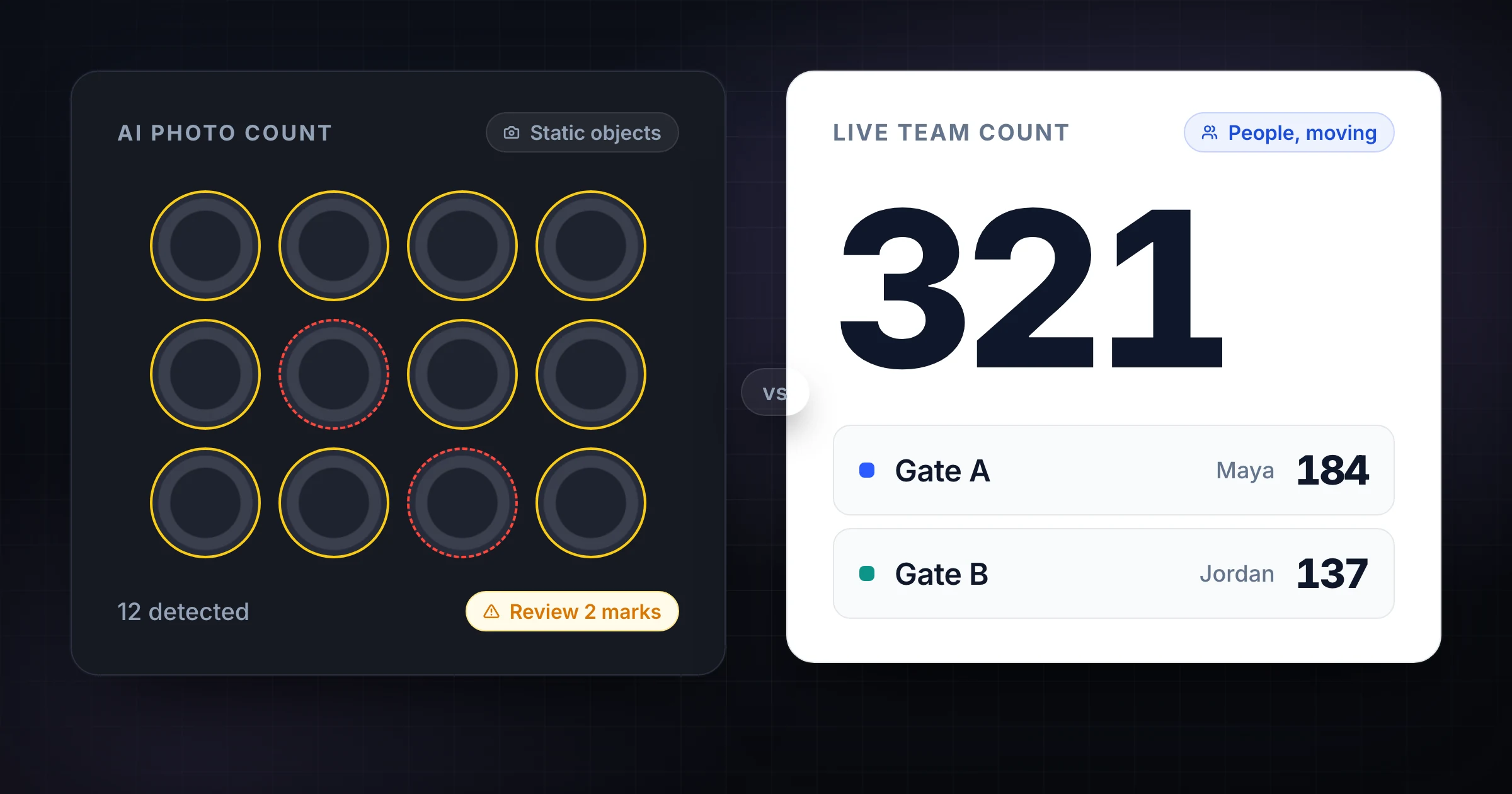
CountThings is useful when the count lives inside a photo.
If you need to count pipes in a stack, logs in a pile, metal parts on a bench, or other repeated objects that can be photographed clearly, AI image counting can save time. The camera becomes the capture surface. The software detects objects. You review the result and export the count.
That is a strong workflow for the right job. It is also the wrong workflow for many teams that are looking for a CountThings alternative.
If you are counting people at entrances, checking inventory by zone, running a stocktake with several counters, or verifying items that move while the work is happening, you may not need AI at all. You need a fast shared count surface, live totals, timestamps, and a team workflow that people can start with little setup. That is the job SnapCount is built for.
This guide compares SnapCount and CountThings by count type, cost, setup, team workflow, and audit needs. If you already know you want the simpler manual workflow, start with the CountThings alternative page and use this article to check the tradeoffs.
The main difference is the counting method
CountThings is an AI photo counting app. You take or upload an image, choose a counting template, let the app identify objects, then review the result. CountThings says its templates are designed to recognize specific object types, and that templates can be created or optimized for your use case.
SnapCount is a manual live counting app. You create counters, invite teammates, and count from iPhone or web. The value is not computer vision. The value is coordination: multiple people can count at the same time, one live total stays current, and the count history remains visible.
That difference shapes almost every buying decision.
| Need | Better fit | Why |
|---|---|---|
| Count identical objects from a clear image | CountThings | AI can identify repeated objects faster than a person tapping one by one |
| Count people entering several doors | SnapCount | People move, routes vary, and live totals matter during the event |
| Run a team stocktake by zone | SnapCount | Several counters can update shared totals in real time |
| Count a static pile with no time pressure | CountThings | A photo-based review can work well when objects are visible |
| Track a recurring manual audit | SnapCount | Templates, timestamps, and shared count history reduce repeat work |
| Count objects with overlap, glare, or mixed types | Depends | AI may need template tuning, manual counting may be more reliable |
The question is not "Is AI better than manual counting?" The question is "Where does the count happen?" If the count happens inside a photo, CountThings is worth evaluating. If the count happens in a live workflow with people, locations, and handoffs, SnapCount is usually the cleaner fit.
When CountThings makes sense
CountThings makes sense when manual counting is slow because the objects are numerous, static, and visible.
Examples include:
- Bundles of pipe or rebar photographed from the end.
- Logs, lumber, or stacked materials with clear outlines.
- Small manufactured parts spread on a tray.
- Repeated shapes in quality checks.
- Industrial counts where the same item type is counted often.
In those cases, the effort of taking a good photo and reviewing AI marks can be lower than counting every object by hand. That is especially true if the same item type is counted repeatedly and a template performs well.
CountThings also makes sense when you need a tagged photo as evidence. A reviewed image can show what was counted, not just the final number. For some industrial audits, that visual record is useful.
The tradeoff is setup sensitivity. AI counting depends on image quality, object shape, overlap, lighting, angle, and template fit. If those inputs are inconsistent, the team spends time retaking photos, adjusting templates, or reviewing false positives and missed objects.
CountThings' official pricing page also positions the product as a paid industrial counting tool. As of June 10, 2026, it lists CountThings from Photos periodic licenses at $120 per month per device, plus 24-hour and pay-per-count options. That can be reasonable for high-value industrial counts. It is often too much for simple headcounts, small stocktakes, or volunteer-run events.
Where AI vision counting falls short
AI image counting is strongest when the count can be reduced to object recognition.
Many operations counts are not like that.
A gate headcount is not a photo problem. People arrive in bursts, leave and re-enter, split across entrances, and move behind each other. A photo captures one instant, but the operational question is cumulative: how many people crossed this threshold during the event?
A warehouse stocktake is often not a single image problem either. You may be counting across aisles, bins, pallets, back stock, quarantine areas, and partial cases. Some items are visible. Others require opening cartons, reading labels, checking lots, or separating damaged stock.
Manual live counting wins when the count depends on human judgment:
| Situation | Why AI photo counting struggles | What manual live counting protects |
|---|---|---|
| People entering doors | The target moves and may appear more than once | Count at the threshold as people enter |
| Mixed inventory bins | Objects may overlap or look similar | Counter confirms the item and quantity |
| Partially opened cartons | Photo cannot always see what is inside | Counter checks the physical stock |
| Multiple zones | One photo cannot represent the whole workflow | Each zone has an owner and live status |
| Recounts and approvals | Image marks do not define process state | Count history shows changes over time |
The issue is not accuracy in a lab. The issue is the job around the number. Who counted it? When did they count it? Was it a first count or a recount? Did another teammate finish a different zone at the same time? Can a supervisor see progress while the work is still happening?
Those are workflow questions, not computer vision questions.
Compare setup time and learning curve
The first week matters because counting tools are usually adopted under pressure.
A warehouse needs a count before month end. A church needs attendance this Sunday. A retail manager needs door counts during a promotion. An event lead needs 4 volunteers counting gates tonight.
SnapCount is designed for that kind of setup. You create a counter, name it, share it, and start counting. If the job needs several areas, create several counters or start from a template. The person counting does not need to understand AI templates, image capture rules, or object detection review.
CountThings has a different setup path. You choose a counting template that matches the object, take a suitable image, run the count, review the marks, and refine the process if results are off. That setup can pay off when the count is repeated at scale. It is friction when the count is simple or the object type changes often.
Use this rule:
| If the count changes often | Lean toward SnapCount |
|---|---|
| Different entrances, shifts, rooms, bins, teams, or events | Manual counters adapt immediately |
| Different object types every day | You avoid finding or tuning templates |
| Volunteers or frontline staff count with little training | The interface is just count, adjust, and save |
| If the count is repeated and visual | Lean toward CountThings |
|---|---|
| Same object type | A template can become efficient |
| Same camera position | Image quality becomes repeatable |
| Same review process | AI output can be checked consistently |
Neither path is universally better. The better path is the one your team can run correctly when the count is busy.
Compare team counting and live visibility
CountThings is strongest as an image capture and review workflow. SnapCount is strongest as a shared team workflow.
That matters when several people count at once.
Imagine a 4-zone stocktake:
| Zone | Counter | Current count | Status |
|---|---|---|---|
| Front stockroom | Maya | 148 | Complete |
| Back aisle | Dev | 92 | Counting |
| Receiving | Jules | 41 | Waiting on pallet move |
| Returns cage | Nina | 27 | Recount needed |
With SnapCount, each owner can update their area from a phone. A supervisor can see live totals and spot the blocked zone before the count window closes. The history shows when the counts changed.
With a photo counting workflow, each person has to capture images, run counts, review results, and send or export numbers. That can work for specific object groups. It is less natural for managing a live floor process.
The same pattern shows up in events. If 3 volunteers are counting entrances, the coordinator needs one live attendance number. A set of photos from each door is not the best source of truth. A shared attendance counter is simpler because it matches the physical flow.
Compare cost by workflow
Do not compare software prices without comparing the job.
CountThings can be worth a higher price when it saves hours on high-volume photo counts. If a team regularly counts thousands of repeated items and the AI result is accurate after review, the cost may be easy to justify.
SnapCount is priced and designed for broader manual counting work: teams, events, warehouses, stores, churches, and recurring operational counts. The value is that more people can count together without buying specialized counting hardware or paying for industrial AI on every device.
Here is the practical cost lens:
| Cost driver | CountThings | SnapCount |
|---|---|---|
| Device count | Paid licenses can be per device | Team workflow is designed around shared counters |
| Setup time | Higher when templates or photo rules need tuning | Lower for simple manual counts |
| Training | Users need to understand image capture and review | Users need to understand the count rule |
| Best ROI case | High-volume repeated photo counts | Repeated live counts with multiple people |
| Poor ROI case | Simple headcounts or small manual audits | Massive static object counts better handled from images |
If the count is worth automating visually, CountThings deserves a trial. If the count is mostly people tapping verified observations into one shared total, SnapCount is the simpler spend.
Use the right tool for each count type
Some teams should use both tools, but for different jobs.
A facilities team might use CountThings to count stacked materials in a yard, then use SnapCount to count people moving through an event entrance. A warehouse might use AI photo counting for uniform parts and SnapCount for zone audits, cycle counts, and supervisor-reviewed spot checks.
The clean split is:
| Count type | Recommended workflow |
|---|---|
| Static repeated objects in a clear image | Try CountThings |
| People entering, exiting, or moving through a space | Use SnapCount |
| Team inventory spot checks | Use SnapCount |
| High-volume identical parts on a controlled surface | Try CountThings |
| Mixed bins, damaged stock, or exception handling | Use SnapCount |
| One-off volunteer or event counts | Use SnapCount |
| Photo evidence required for every count | Try CountThings |
For inventory teams, the best manual workflow often starts with the warehouse counting use case. You can structure counters by aisle, area, SKU class, or count owner, then export the result for reconciliation.
A decision checklist
Use this checklist before replacing CountThings or choosing between the 2 products.
| Question | If yes, lean toward |
|---|---|
| Can the full count be captured in clear photos? | CountThings |
| Does the team count live across multiple locations? | SnapCount |
| Do you need several people updating one shared total? | SnapCount |
| Is every item the same shape and visible from one angle? | CountThings |
| Do counters need almost no training? | SnapCount |
| Do you need photo evidence with marked objects? | CountThings |
| Is the count mostly people, doors, rooms, or zones? | SnapCount |
| Is the count repeated enough to justify template setup? | CountThings |
The easiest mistake is buying AI because the count feels messy. AI helps when the mess is visual repetition. It does not automatically solve ownership, definitions, handoffs, or live progress.
If the count is messy because people need to coordinate, fix the workflow first.
Frequently asked questions
What is the best CountThings alternative?
SnapCount is a strong CountThings alternative when you need manual live counting instead of AI photo counting.
It is built for teams that count people, inventory areas, event gates, rooms, shifts, and recurring audits. If your count is a static photo of repeated objects, CountThings may still be the better fit.
Is CountThings worth it?
CountThings can be worth it for high-volume repeated object counts from photos.
It is less compelling for simple headcounts, small inventory checks, or team workflows where the count happens live. In those cases, the setup and device cost may be harder to justify than a shared manual counter.
Do I need AI to count inventory?
No, you do not always need AI to count inventory.
AI helps when the items are visible, repeated, and easy to photograph. Manual counting is often better when staff must verify labels, inspect partial cases, handle exceptions, or split work across zones.
Can SnapCount count from photos?
No. SnapCount is not an AI photo counting tool.
SnapCount is a live manual counting tool. Use it when people are observing the count directly and need shared totals, history, exports, and team coordination.
Can I use SnapCount and CountThings together?
Yes. Use each tool for the count type it fits.
CountThings can handle photo-based object counts. SnapCount can handle live manual counts, team stocktakes, entrance counts, attendance, and recurring operational checks.
Bottom line
Choose CountThings when the count is a photo problem.
Choose SnapCount when the count is a team workflow.
If you are replacing CountThings because an image-recognition workflow is too much for headcounts, stocktake checks, event counts, or manual verification, start with SnapCount. Create a counter, invite the team, and run the count live without configuring a counting template.
Compare SnapCount with CountThings and choose the workflow that matches how your team actually counts.
Topics: countthings alternative, ai counting, inventory counting, manual counting
About SnapCount Team
The SnapCount Team builds and tests shared counting workflows for events, inventory, attendance, and field work. We review guides when product workflows change and link to the tools we use to validate them.
Contact SnapCount support